
Featured Software
ComTest Pro
Communication software for Modbus RTU and Modbus TCP devices.
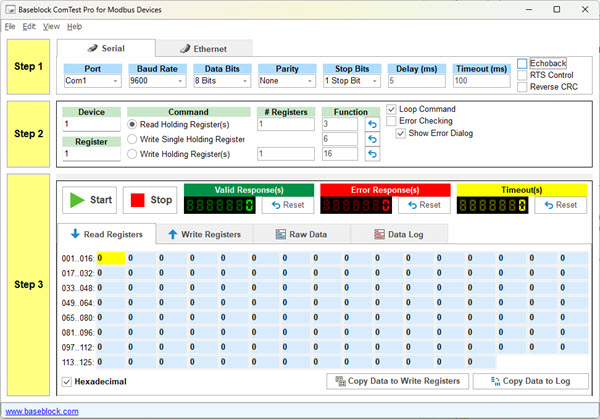
ComTest Pro
Test & Troubleshoot Modbus RTU and Modbus TCP
This complimentary program lets you test and troubleshoot Modbus RTU and Modbus TCP communication by sending single or multiple read or write commands to the connected device. The software offers comprehensive data-logging, data-formatting, and error-checking features — making it easy to validate communication, isolate field-bus issues, and verify register maps before commissioning.
Specifications
System Requirements & Features
Software Requirements
- Windows PC running Windows 7 or higher
- Minimum 20 MB of free disk space
- Serial Port or Ethernet Port
Features
- Communication via Serial or Ethernet
- Support for Modbus RTU and Modbus TCP
- Serial communication baud rates up to 230.4K
- Adjustable Transmission Delay Time
- Adjustable Response Delay Time
- Selectable RTS Control
- Selectable Echoback Suppression
- Reverse CRC Support
- Loop / Repeat Command
- Read Holding Registers (0x03) with customizable function codes
- Write Single Holding Register (0x06) with customizable function codes
- Write Multiple Holding Registers (0x10) with customizable function codes
- Read function support for up to 128 data registers
- Write function support for up to 128 data registers
- Read or Write a range of user-specified registers
- Read or Write registers auto-color for valid and error response
- Comprehensive error checking
- Advanced Error Checking Dialog
- Error message suppression function
- Decimal / Hexadecimal logging
- Raw data view selectable Hex / Dec
- Detailed logging with date and time stamp
- Save log file in text or rich text format (color-coded)
- Independent Valid, Error and Time-Out counters with reset functions
- Valid Response Counter with independent Reset function
- Error Response Counter with independent Reset function
- Time-out Response Counter with independent Reset function
- Comprehensive Help File
Need Help With Your Installation?
Our team can help you get up and running — from Modbus diagnostics to full SCADA deployment.
Request a Quote Contact Us